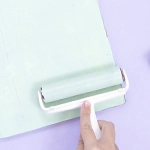
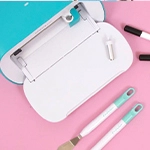
After the success of the Mini Cinch, We R Memory Keepers, has launched another mini binding machine, this time for a new type of binding, planner disc binding. This is the Mini Disc Cinch Bindery Tool.

This type of binding may be at its biggest moment right now. Many projects are done with this format and there are more and more tools and accessories to help us make these projects. The success of this type of binding is no surprise, as it is a very practical format. At any time one can modify the organization of the sheets, add them, remove them or move them around without damaging the project quickly.
If you have a planner, you can use its covers year after year, as you only have to change the inside and that's it! You have a new planner now.
For all these reasons, this kind of binding is becoming so popular and We R has noticed it. To make our life a little easier and to make our work much simpler, they have created a Cinch machine for disc bindings, the revolution for our planners!

How does the Mini Disc Cinch Bindery Tool work?
Using it is very simple and if you have the Mini Cinch you won't have any problems, as it works in the same way.
As with its sister, the Mini Cinch that makes square holes, it can punch up to 80 grams at a time, about 20 pages (although it will depend on the grammage).
When positioning the pages for hole punching, it is important to take into account the size of your sheets. The machine itself includes a guide to help us place our pages in the right place. Just place the guide (you will find it on the side of your machine) in the different positions, A, B, or C:
- Position A: if the paper measures whole or half inches (for example 2", 5", 3.5" or 6.5"), ends in 1/8 o 7/8 you should place the alignment guide in position A. You should choose this position also is your paper has the size of an A4, A5, A6 o A7.
- Position B: this is the position to place the paper ends in, half an inch, a quarter of an inch or 3/8.
- Position C: if the sheet you are going to bind ends in 5/8 o 3/4, place the alignment guide in the letter C.

Whether you are using these positions or you have decided to centre the paper with the ruler, it's time to start punching. If your sheet is larger than the machine, place the second to last hole in the paper under the alignment tab on the left side of the machine. Lower this tab and your continuous perforations will be perfect.
Now you just need to repeat the process with the rest of the sheets of our project, add some rings and your project is ready.
So that everything is better explained, we have made a video to show you everything you need to know about this tool.
What do you think about this new tool? Let us know if you have already jumped on the planner disc binding trend and which are your favourite tools.